Using Application Gateway for Containers in your AKS Cluster
Using Application Gateway for Containers in your AKS Cluster
Hello and welcome back to my blog! In this post, I want to talk about a topic that has become increasingly relevant for anyone running Azure Kubernetes Service (AKS) clusters: migrating from NGINX Ingress Controller to another ingress solution, in this case Application Gateway for Containers.
As you might have seen in the retirement announcement official Kubernetes blog post, the NGINX Ingress Controller is being retired, which means we need to start thinking about alternatives for our ingress traffic management. While this might seem like a huge problem at first, I see it as an excellent opportunity to explore a more cloud native solution that is integrated within the Azure Cloud.
I've been building several AKS clusters using the NGINX Ingress controller, and when I heard about the retirement, I start looking for an alternative and came up with Application Gateway for Containers. Of course, one of my considerations was using an Azure native solution if possible.
Let's start by understanding what Application Gateway for Containers brings us and why it might be the right choice for your AKS workloads!
What is Application Gateway for Containers
So what is Application Gateway for Containers exactly? Well, it's Microsoft's layer 7 load balancing solution specifically designed for Kubernetes workloads. Think of it as the evolution of the Application Gateway Ingress Controller that many of us have been using, but with a completely new architecture and a lot of features.
Application Gateway for Containers is a cloud native ingress solution that is located outside your AKS cluster and manages all incoming traffic to your containerized applications. This new solution was built from the ground up to work seamlessly with Kubernetes, specifically supporting both the standard Ingress API and the newer Gateway API.
But how does it work?
The architecture is quite straightforward and consists of three main components:
- Application Gateway for Containers resource This is the main Azure resource that handles all the traffic management
- Frontends These define the listeners and IP addresses that accept incoming traffic
- Associations These link your Application Gateway to specific subnets and AKS clusters
The following dependencies are also referenced in an Application Gateway for Containers deployment:
- Private IP address
- Subnet Delegation
- User-assigned Managed Identity
A real plus and positive point is how it integrates with your AKS cluster. The solution uses an ALB Controller that runs inside your Kubernetes cluster. This controller watches for changes in your Ingress or Gateway API resources and automatically configures the Application Gateway for Containers accordingly. So when you create a new Ingress rule in your cluster, the ALB Controller picks this up and configures the necessary routes in Application Gateway for Containers almost in real time!
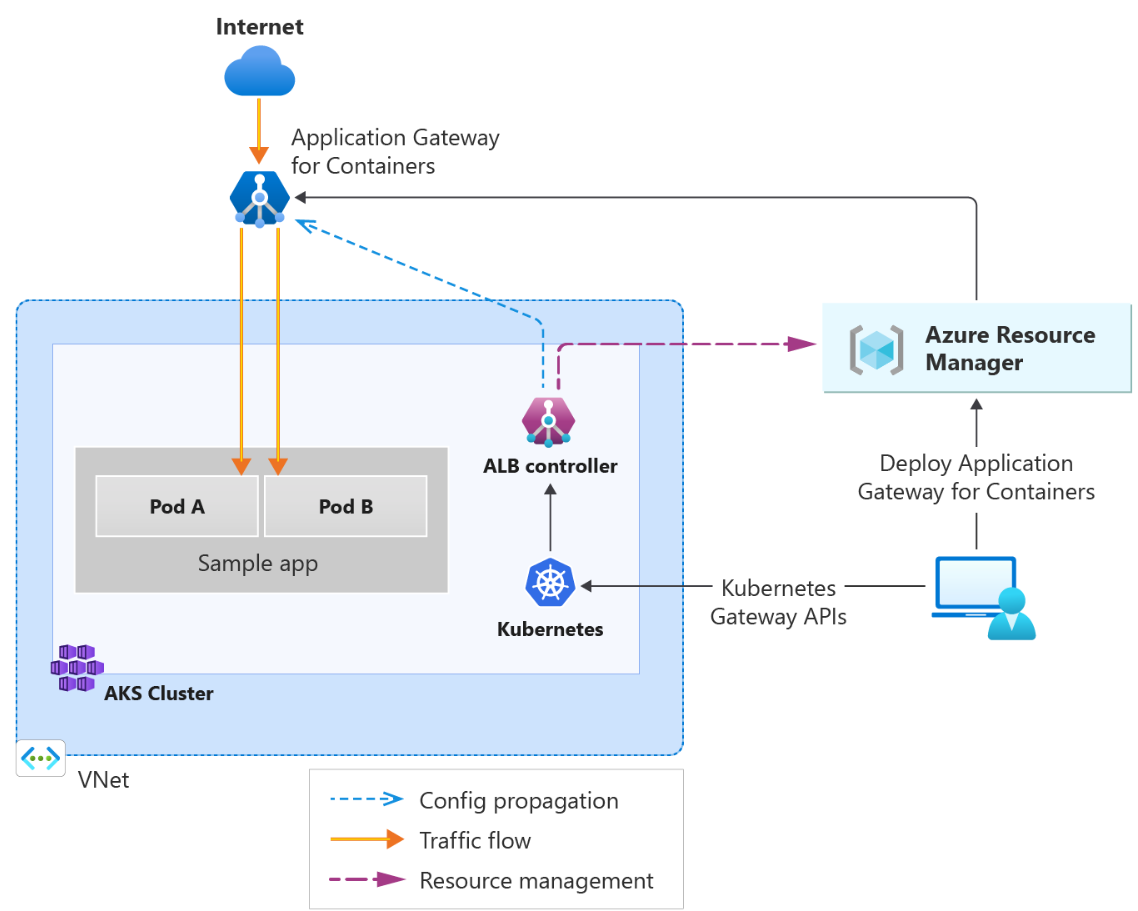
The traffic flow is quite simple as shown in the picture above: requests from the internet hit your Application Gateway for Containers frontends, which then route them to the appropriate backend pods in your AKS cluster based on the rules you've defined in your Ingress or Gateway API configurations.
So what makes it special?
Application Gateway for Containers comes with some really cool features for load balancing like:
Traffic Management Capabilities:
- Automatic retries If a backend pod fails, it automatically retries the request
- Autoscaling Scales based on your traffic patterns without you having to think about it
- Availability zone resiliency Spreads across multiple zones for high availability
- Traffic splitting/weighted round robin Perfect for blue-green deployments
- Header and URL rewrites Modify requests and responses
Security Features:
- WAF integration Built-in Web Application Firewall support for protecting your applications
- Mutual TLS (mTLS) Support for mutual authentication to frontend, backend, or end-to-end
- SSL termination and End-to-End SSL Flexible SSL/TLS configurations
Protocol Support:
- HTTP/2 and WebSocket support
- gRPC for modern microservices architectures
- Server-sent events (SSE)
Routing: You can route traffic based on:
- Hostname
- Path (prefix or exact match)
- Headers
- Query strings
- HTTP methods
Deployment flexibility and why should we migrate to Application Gateway for Containers
One thing I really appreciate is that you have two deployment strategies to choose from:
Bring Your Own (BYO) deployment You manage the lifecycle of the Application Gateway for Containers resource yourself using Azure Portal, CLI, PowerShell, This gives you full control over when resources are created and deleted.
Managed by the ALB Controller The ALB Controller handles everything for you. When you create an ALB Controller custom resource in Kubernetes, the controller automatically provisions the Application Gateway for Containers resource and manages its lifecycle. This is great for teams that want a more automated approach.
So why would you want to migrate from the planned retirement of NGINX Ingress to Application Gateway for Containers? Here are a few reasons that stand out for me:
- Azure native solution Integration with Azure services and monitoring
- Near real-time updates Changes to pods, routes, and health probes are applied almost instantly
- Better scaling Elastic and more efficient autoscaling compared to NGINX
- WAF integration Web Application Firewall support without additional components
- Enhanced security Built in advanced security features
Are there drawbacks?
Now, I think it's important to be honest about some of the considerations and potential drawbacks of using Application Gateway for Containers. Because no solution is perfect (not at the start), and knowing this beforehand, will give you an opportunity to make an well thought decision.
Regional availability limitations
While it's available in most major regions like West Europe, North Europe, US and UK regions, you'll need to check if it's available in your specific region. If you're working in a region that's not yet supported.
Port restrictions
Only supports ports 80 and 443 for listeners. If you're running services that need custom ports exposed through your ingress, this could be a limitation/blocker.
Learning curve and migration effort
If you're coming from NGINX Ingress, expect a learning curve when moving to Application Gateway for Containers. Your current NGINX Ingress annotations and configurations won’t carry over, so you’ll need to rewrite your ingress rules using the standard Ingress API or the newer Gateway API.
Additional Azure dependencies
Additional Azure resources needs to be configured:
- Delegated subnet for the Application Gateway
- User-assigned managed identity
- RBAC permissions
- Additional network configuration
This means more infrastructure to manage and potentially more complexity in your setup compared to running a simple NGINX pod in your cluster.
Pricing considerations
Cost is always a factor to consider. Application Gateway for Containers will charge consumption when used this is different then your nginx ingress controller. You can check the costs Application Gateway pricing page For smaller environments or development clusters, running other ingress controllers could be a cheaper option.
Lifecycle management
Depending on which deployment strategy you choose, you might need to manage resources both in Azure and Kubernetes. With the BYO deployment approach, you're responsible for keeping Azure resources and Kubernetes configurations in sync.
Limited to AKS
Application Gateway for Containers is specifically designed for Azure Kubernetes Service. If you're running Kubernetes on-premises or in other cloud environments, this solution won't work for you.
So should you migrate to Application Gateway for Containers?
Yes! despite these considerations, I still think Application Gateway for Containers is a very good solution, especially if you're already in the Azure Cloud and want a fully managed, Azure native ingress solution.
For my use cases, the benefits outweigh the drawbacks, especially since I'm already working with Azure resources. The WAF integration, scaling, and Azure native monitoring capabilities make it worth the step.
And yes, it's important to note that Application Gateway for Containers is a completely separate product from the traditional Application Gateway, so if you're familiar with the standard Application Gateway, there will be a learning curve.
But don't worry, I'll be walking you through the entire migration process step by step, showing you how to set this up, and how to migrate your existing NGINX Ingress configurations to Application Gateway for Containers.
So hopefully i will see you back in my next blog how to set up Application Gateway for Containers!